The Art of Pixel Magic: Visual Effects for Indie Developers

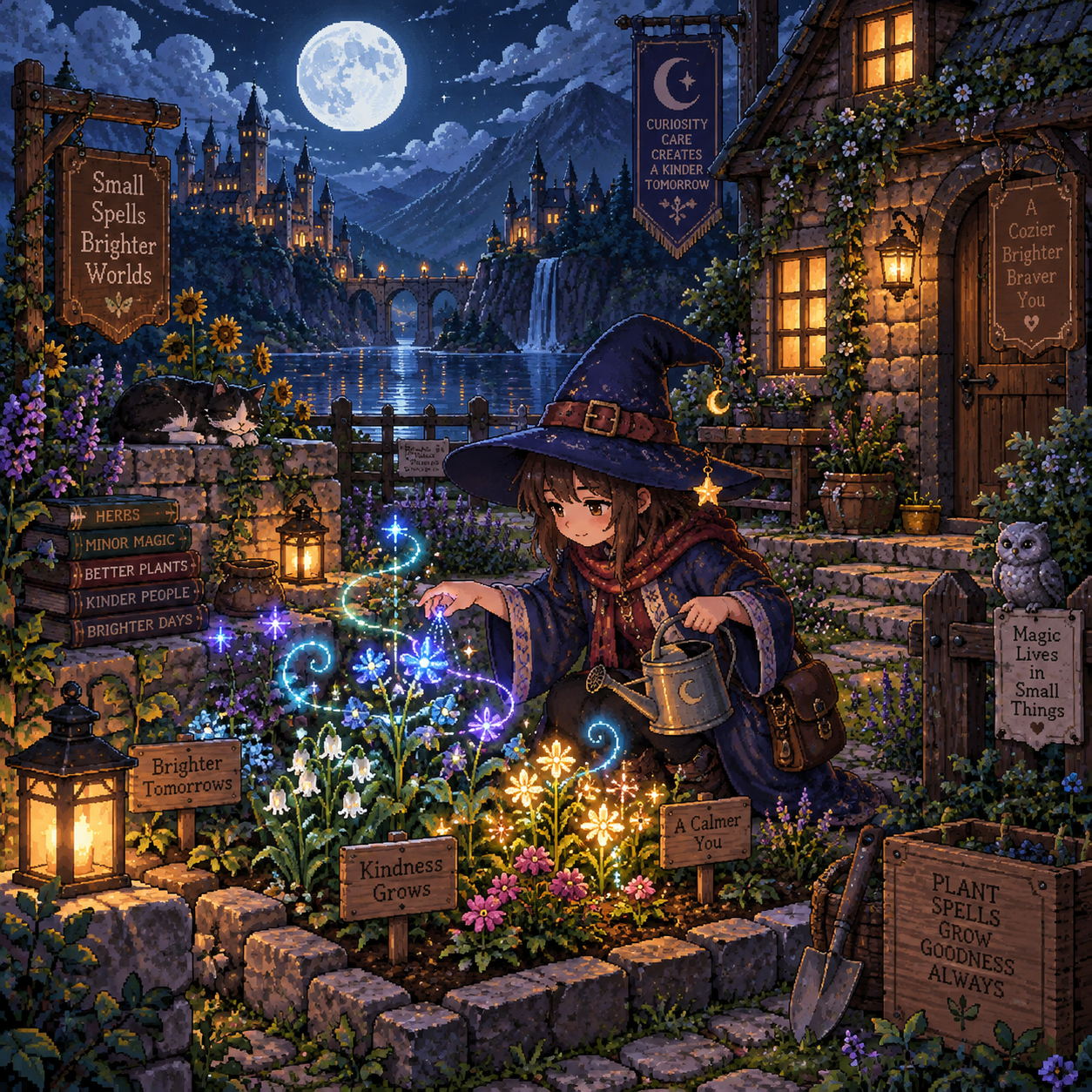
In a pixel-art game, a few well-placed pixels can make a spell feel alive, a harvest feel rewarding, or a quiet evening feel enchanted. For indie developers, visual effects (VFX) work best when they support the art direction and explain what is happening, rather than competing with the artwork.
That balance matters especially in a wizard-apprentice life-simulation game. Players need to read spells and interact with their surroundings, but they also want to enjoy the small rituals of tending a garden, gathering ingredients, and making a home. Thoughtful effects can make both feel magical without demanding a large team or a complicated pipeline.
Why Visual Effects Matter in Pixel-Art Games
Visual effects make pixel-art games feel more expressive by reinforcing mood, action, and gameplay feedback. They help players notice what changed and understand why, while strong art direction remains the foundation.
A brief sparkle can confirm that an ingredient has been collected. A soft glow around a newly enchanted plant can show that a spell worked. A few drifting motes in a quiet room can add atmosphere without changing the gameplay at all. Each effect has a job, even when that job is simply to make a moment feel warm or mysterious.
For indie game development, small, intentional effects offer a practical way to add polish without creating dozens of new character or environment assets. The trade-off is that effects draw attention: use too many at once and they can muddy the silhouettes, colors, and handcrafted look that make pixel art readable. Treat VFX as part of the visual language, not as decoration pasted on top.
Start with the Feeling, Not the Effect
Choose a visual effect by deciding what the player should feel or understand first. A spell meant to feel playful needs different color, motion, and timing from one that feels powerful or risky.
Before opening an animation tool, finish this sentence: “When this happens, the player should feel…” For an apprentice wizard, the answer might be curiosity when discovering a herb, confidence after mastering a spell, or caution when magic is unstable. That emotional target gives you a useful filter for design choices.
- Playful: Use a bouncy arc, a short-lived cluster of bright particles, and a quick, soft pop.
- Powerful: Let the effect build before release. A brief pause followed by a firm flash or expanding ring gives the spell weight.
- Risky: Add an uneven flicker or a small, irregular spark. Keep the warning distinct from ordinary spell success.
- Comforting: Favor slow drifting motes, gentle color changes, and a glow that fades rather than snaps away.
This approach prevents a common mismatch: using the same burst for every action because it is easy to reuse. Reuse components where it saves time, but change the timing, palette, and motion so the effects communicate different outcomes.
Building Spell Effects from Simple Elements
Readable spellcasting effects combine a clear shape, a small number of particles, a purposeful color, and animation timing that matches the action. A simple sequence often feels more convincing than a large burst of detail.
Build an apprentice’s spell in layers. Start with the caster’s gesture or a small focal point at the wand. Add a projectile or short trail to show direction, then a compact impact effect to mark the result. The player should be able to tell where the spell began, where it went, and what it affected.
A healing charm might begin with two or three pale motes gathering at the wand, travel as a steady green or gold spark, then finish with a brief leaf-shaped shimmer over the target. For a fire spell, use a warm core and a few upward-moving pixels. A long trail of particles may look lively, but it can obscure nearby objects, so keep it short and purposeful.
Animation timing does much of the work. Give the cast a readable anticipation, make the travel phase quick enough to feel responsive, and hold the impact just long enough to register. If every phase lasts the same amount of time, the effect can feel mechanical. Try a few frames of buildup, a fast release, and a slightly longer fade, then adjust in the actual game rather than judging from a sprite sheet alone.
Particle systems can be simple: a small pool of reusable sprites with controlled direction, speed, lifespan, and spawn count. Fixed, predictable particles are often easier to art-direct than highly random ones. Use randomness sparingly, since inconsistent shapes or colors can make a carefully composed pixel effect look noisy.
Make Everyday Actions Feel Magical
Everyday life-simulation actions feel magical when their VFX are subtle, brief, and tied to a clear result. A harvest, a recipe, or a home improvement usually needs a small confirmation, not a spell-sized spectacle.
When the wizard apprentice gathers ingredients, let a tiny glint appear at the plant before one or two pixels drift toward the inventory area. A successful watering spell could produce a quick ripple and a fresh highlight on the soil. For a garden harvest, a small leaf flick or soft burst of pollen can signal success while leaving the plant and surrounding tiles visible.
Home upgrades offer another chance to make progress tangible. When the player places a new shelf or improves a workbench, try a brief dust puff followed by a warm glow on the finished object. The effect gives the action a sense of completion without making routine decorating feel noisy. For cooking or potion-making, a bubble, color shift, or short wisp of steam can show a stage change at a glance.
Consider the rhythm of play. A rare spell discovery deserves more attention than collecting the tenth common mushroom in a session. Reserve larger effects for milestones, and make repeated actions quieter. That contrast helps important moments stand out while keeping the daily loop comfortable.
Keep Pixel Effects Readable and Consistent
Pixel effects stay readable when they respect the game’s scale, palette, animation timing, and visual hierarchy. Players should be able to see the character, target, and result even when an effect is active.
First, work at the game’s actual pixel scale. If characters use crisp clusters and limited colors, effects built from smooth gradients or tiny subpixel motion may feel like they belong to another game. Use a shared palette or a small set of effect colors, and reserve the brightest tones for important feedback such as a successful cast or a rare discovery.
Next, check contrast and screen coverage. A glow behind a character can help separate them from a dark room, but a large, bright flash can hide hazards, interactable objects, or the spell’s target. When the effect overlaps gameplay information, reduce its opacity or duration, move its brightest pixels toward the edge, or replace it with a clearer outline or icon-like cue.
- Scale: Keep routine effects close to the size of the object or action they describe.
- Palette: Use color consistently so players learn what different magic types or outcomes mean.
- Timing: Make feedback long enough to notice, but short enough not to delay repeated actions.
- Hierarchy: Let the character and gameplay target remain more important than decorative particles.
Test in motion, at the intended display size, and against both bright and dark backgrounds. Pixel art can read beautifully zoomed in and become a blur at normal play size. Keep performance in mind too: a modest particle count and short lifetimes are generally easier to manage, especially when multiple effects can appear together.
A Practical Indie Workflow for VFX
A practical indie VFX workflow starts with a rough prototype, reuses a few flexible components, and tests each effect in its gameplay context. This keeps the work manageable for a solo developer or small team.
Use this four-pass process:
- Define: Write down the effect’s purpose, the action that triggers it, and the information it must communicate.
- Block out: Use placeholder shapes to test position, duration, and screen coverage before polishing individual pixels.
- Build components: Create reusable pieces such as spark sprites, short trails, glow frames, and impact rings.
- Test and refine: Play through the action at normal speed and ask whether the effect is easy to read, pleasant to repeat, and consistent with the game’s tone.
Reusable components can save time, but build them as a kit rather than a one-effect-fits-all solution. A spark sprite might work for a wand cast, a potion result, or a garden discovery, while changes to its color, direction, scale, and timing give each use its own character. That flexibility is useful; the limitation is that overusing the same motion can make different actions feel interchangeable.
Keep the scope tight. Prototype one effect for a common action and one for an important milestone before making a library. If the common action feels satisfying after several repetitions, you have a better foundation than a folder full of untested animations.
Polish Through Feedback and Restraint
Polish VFX by checking whether they clarify play and strengthen the game’s atmosphere, then remove anything that distracts. A successful effect earns its place through what it tells the player, not through how many pixels it contains.
Ask testers focused questions: Did they notice the spell hit? Could they tell whether the plant was watered? Did the garden still feel calm after several harvests? Watch what players do, too. If they pause because they cannot see an object, shorten or reposition the effect. If they repeat an action and the animation starts to irritate them, trim its duration or reduce its brightness.
For a cozy wizard life-simulation game, restraint can be a feature of the world. Let major spell discoveries bloom with color and motion, while ordinary chores receive quiet, tactile responses. That contrast gives both kinds of moment room to breathe. In pixel-art games, a handful of carefully timed pixels can make magic feel present, readable, and worth returning to.